ChatGPT Business Hub: How to Get Verified and Actually Get Recommended by ChatGPT
What is the ChatGPT Business Hub?
How to claim your business in the ChatGPT Business Hub (7 steps)
Step 1: Enter your legal business name
Step 2: Choose physical or online
Step 3: Add and verify your website
Step 4: Pick your category and write your description
Step 5: Upload a photo of your ID
Step 6: Complete the face scan
Step 7: Submit and wait for approval
Verification made it official. It didn't make me visible.
When everyone is verified, what makes ChatGPT pick you?
Where AI looks when it decides who to recommend
When everything says the same thing, you become unignorable
Your AI visibility action plan for this week
What is the ChatGPT Business Hub?
Does getting verified on ChatGPT mean ChatGPT will recommend my business?
How do I get recommended by ChatGPT?
How long does it take to get verified in the ChatGPT Business Hub?
ChatGPT was sending people my way before I ever verified my business. It already knew my name. It already knew what I did. And that's because I had already done the work.
On November 10th, OpenAI launched the ChatGPT Business Hub, and everyone is rushing to claim their business and get verified. You absolutely should. But if you think verification is what gets ChatGPT to recommend you, I want to stop you right there.
Verification is step one. It is not the strategy. In this post I'm walking you through how to claim yours in 7 steps (including the mistake that got me rejected the first time), what I saw inside mine, and what actually makes ChatGPT (and Gemini, and Claude) pick you over everyone else.
What is the ChatGPT Business Hub?
The ChatGPT Business Hub is a new space from OpenAI where you can claim your business in ChatGPT and get verified. Think of it this way: what Google Business Profile is to Google and Gemini, the Business Hub is to ChatGPT.
Once you're in, you get a short business description and a dashboard that shows how ChatGPT has been talking about you. Mine shows the last 28 days of mentions, which is my favorite part.
A couple of important notes before you get too excited:
It's a beta. Things will change.
OpenAI says claiming it doesn't guarantee better placement. It makes you official. It doesn't make you recommended.
Now let's get you approved.
How to claim your business in the ChatGPT Business Hub (7 steps)
Fair warning: you can't fake your way into this one. But it shouldn't take more than 10 minutes.
Have these ready before you start:
Your legal business name, exactly as it appears on your EIN (and your EIN number)
Access to your website's domain settings (or your web person on standby)
A photo ID
Your phone or a camera for a quick face scan
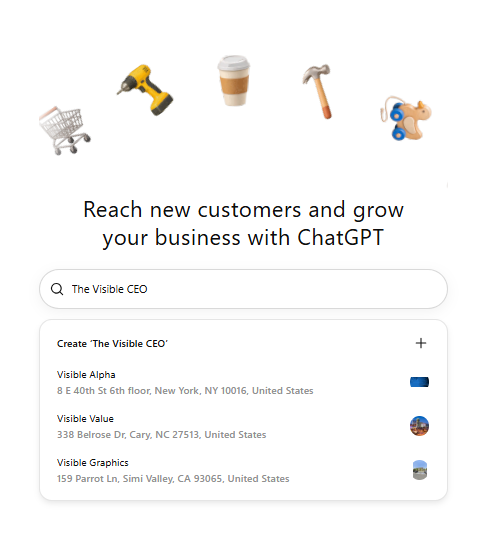
Step 1: Enter your legal business name
Your business name has to match your EIN. Not your nickname. Not your brand vibe. Your legal name.
Quick tip: you can add your DBA later in the process.
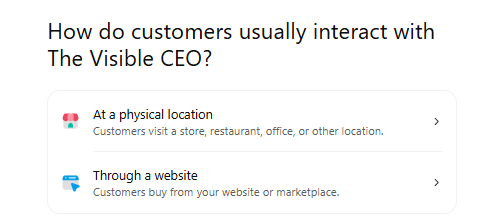
Step 2: Choose physical or online
Tell it whether you're a physical business or an online business.
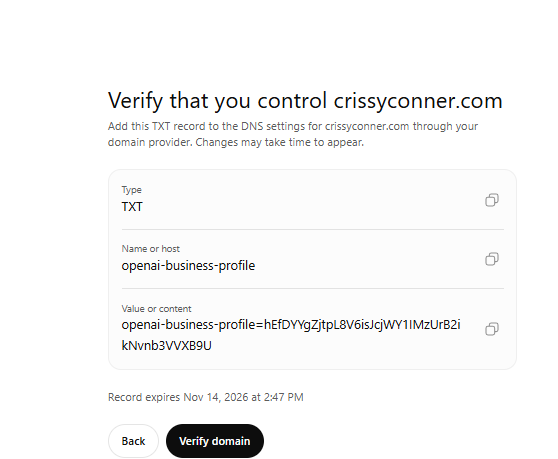
Step 3: Add and verify your website
Add your website, then verify that you own the domain with a TXT record. That's a small line of text you add in your domain settings to prove the site is yours.
If that just made your eye twitch, hand it to your web person.
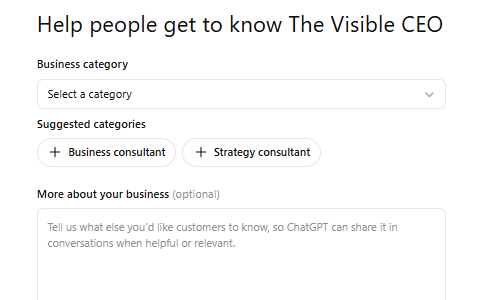
Step 4: Pick your category and write your description
Pick your business category. There are a ton of them, and there are still plenty missing.
Quick tip: start typing your description and it'll suggest categories for you. Make that description specific, because it's short (more on why that matters below).
Still with me? Good. Next up are a few questions about your business. Answer them and keep going. Then it gets personal.
Step 5: Upload a photo of your ID
Snap a photo of your ID. There are a few options to choose from. They want proof there's a real human behind the business.

Step 6: Complete the face scan
Look straight ahead. Turn left. Turn right.
Not gonna lie, I felt like I was at the DMV. For robots.
Step 7: Submit and wait for approval
Submit it and wait for approval.
Confession: I failed round 1. I used my DBA instead of my registered business name. Yes, the exact thing I told you not to do in step 1.
Round 2? Approved.
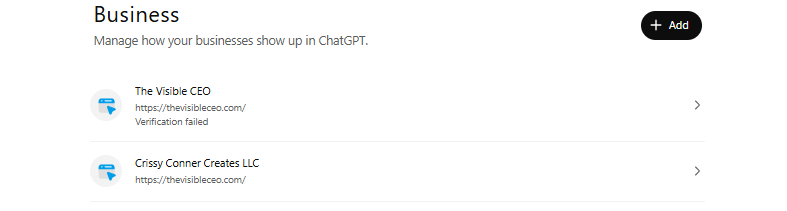
So that's it, right? You're verified, so ChatGPT will start sending you clients?
Not quite.
Verification made it official. It didn't make me visible.
When I checked in October, I had over 100 AI mentions in a single month. Some came from ChatGPT, some from Gemini and some from Claude. That's 100 more opportunities for someone to find me.
So when I logged into the Business Hub, I didn't have to wait to see data. The dashboard was already full, because ChatGPT was already talking about me. Now I can see exactly which mentions came from ChatGPT.
Let's be clear about what a mention is, though. It doesn't mean they clicked your link. It doesn't mean they bought from you. But it does mean you exist, and that you're at least somewhat visible to AI.
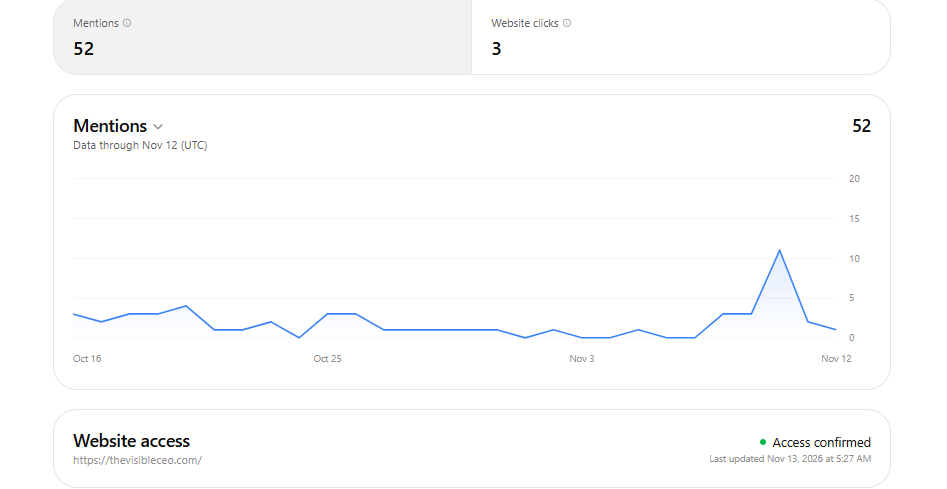
Verification didn't create any of that. I was already visible to AI because that's what I teach. It's the OMNI Method: we make sure you are visible across the feed, across search and across AI, all working together. I've been teaching it for years. We just didn't know back then how big of an impact it would have in the AI world.
When everyone is verified, what makes ChatGPT pick you?
Pretty soon, everyone is going to have this. Every business will be verified. So verification alone won't set you apart.
Here's the thing. The blurb ChatGPT gives you is about the length of an Instagram bio. Nobody decides to buy from someone based on 150 characters. And it doesn't give AI a sliver of what you actually do.
Even for me as a visibility strategist, there are so many nuances. Am I just on the feed? Am I an SEO expert? An AI visibility expert? Do I help you get on video? A short blurb can't answer any of that, for people or for AI.
So AI isn't going to rely on that little blurb. It's going to take in everything it can find about you online, and that's how it decides who to recommend. ChatGPT sends clients to the businesses it can find everywhere.
Where AI looks when it decides who to recommend
AI pulls from every place your business shows up. Here's where to focus:
Your website. This is home base. If it's outdated or vague, AI repeats that.
YouTube. YouTube shows up in the top four AI sources in every industry.
LinkedIn. Another highly weighted platform, especially for service providers and coaches.
Your blog and podcast. Long-form content that answers real questions is gold for AI.
Social media. Social is the most searchable it's ever been. In summer 2025, Instagram started letting Google index public content from professional accounts, so your posts can now show up in search.
The question to ask yourself: can Google find me, and do I have content that actually answers what my people are asking?
AEO and GEO, in plain English
You're going to hear these letters a lot, so here's what they mean:
AEO (answer engine optimization): making your content the answer when someone asks a question. AEO has been around since before AI. It just got way more important. (side note: content isn't just social media content, it's diversifying your content across the above)
GEO (generative engine optimization): making sure AI tools like ChatGPT, Gemini and Claude use you in the answers they generate.
Both basically mean one thing: being the answer AI gives and be cited when people ask about what YOU do.
You don't need a thousand topics to talk about over and over. You need to answer your buyers' questions the way they would ask them. Do that consistently, across the feed, across search and across AI, and you're doing AEO and GEO whether you call it that or not.
Get people talking about you
You can't be the only one saying what you say about you. AI trusts what others say about you, too.
That's where these come in:
Articles and PR that mention you by name and what you do
Guest spots on other people's podcasts
Testimonials that prove the results you claim
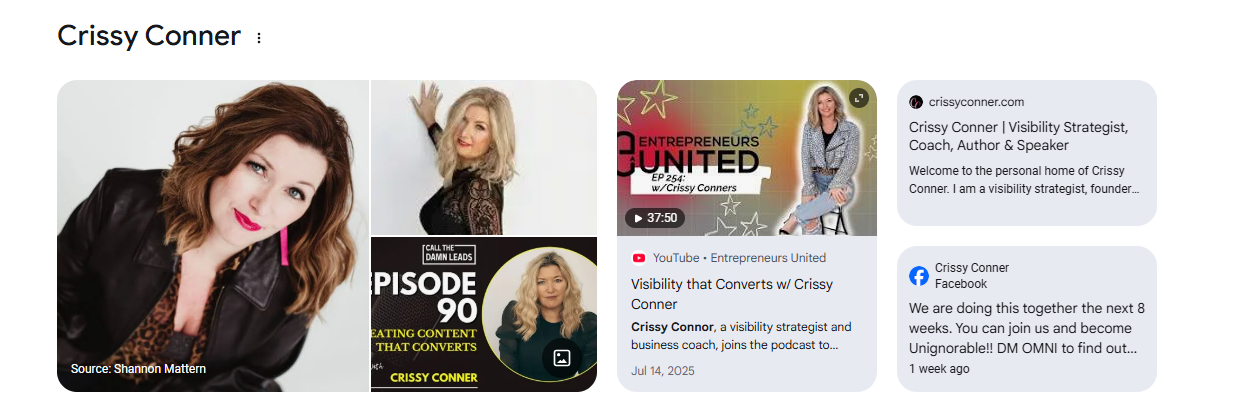
When everything says the same thing, you become unignorable
Here's a stat that should get your attention: 40 percent of business owners who checked what AI says about them found wrong information about their business.
When ChatGPT is scouring the internet, everything it finds about you needs to say the same thing. No confusion. No wrong answers. How can AI recommend you if the internet says a million different things about you? If you have a dozen different titles out there, or you've changed your business name every six months, AI doesn't know who you are either.
But when your website, your YouTube, your LinkedIn, your blog and your social media all say the same thing, something kind of magical happens. You become unignorable. Not just to humans, but to AI.
Honestly, this is making us better business owners. It's forcing us to double check our websites and make sure everything is correct.
Your AI visibility action plan for this week
Claim your business in ChatGPT. Everyone else is doing it, and you should too. Follow the 7 steps above, and use your legal name, not your DBA.
Ask AI what it knows about you. Ask ChatGPT, Gemini and Claude what they can find about you publicly. Then ask where they're finding anything wrong, so you can go fix it.
Write a statement about you that's specific. Ask ChatGPT or Claude who publicly fits that statement. If it gives you fifty-eleven people who do something similar, it's too vague. Keep sharpening it until you're the outlier.
Pick the five questions your clients ask most, and answer one this week. A blog post, a YouTube video, a podcast episode or a post. Answer it the way they'd ask it.
Biggest takeaways
The ChatGPT Business Hub launched November 10 and lets you claim and verify your business in ChatGPT in about 10 minutes.
Verification makes your visibility official. It doesn't create it.
The Business Hub blurb is about the length of an Instagram bio, so AI looks everywhere else to decide who to recommend.
YouTube and LinkedIn are two of the most heavily weighted sources AI pulls from.
40 percent of owners who checked found wrong information about their business in AI answers. Consistency matters.
When your website, content and social all say the same thing, you become unignorable to humans, search and AI.
One more: your business name has to match your EIN. Using my DBA is exactly why my first try failed.
Frequently asked questions
What is the ChatGPT Business Hub?
The ChatGPT Business Hub is OpenAI's new tool, launched November 10, that lets you claim and verify your business in ChatGPT. It's similar to what Google Business Profile does for Google. It's currently in beta.
Does getting verified on ChatGPT mean ChatGPT will recommend my business?
No. OpenAI says claiming your business doesn't guarantee better placement. Verification is step one. ChatGPT still decides who to recommend based on everything it can find about you online.
How do I get recommended by ChatGPT?
Be visible and consistent everywhere AI looks: your website, YouTube, LinkedIn, your blog or podcast and social media. Answer your clients' most common questions, get other people talking about you, and make sure every platform says the same thing about who you are and what you do.
What are AEO and GEO?
AEO stands for answer engine optimization and GEO stands for generative engine optimization. Both mean making your business the answer that search engines and AI tools give when someone asks a question.
How long does it take to get verified in the ChatGPT Business Hub?
The application itself takes about 10 minutes. You'll enter your legal business name, verify your website with a TXT record, choose a category, upload a photo ID and complete a face scan. Then you submit and wait for approval.
Why did my ChatGPT Business Hub verification fail?
A common reason is a business name that doesn't match your EIN. My first application failed because I used my DBA instead of my registered business name. Use your legal name, then add your DBA later in the process.
Verification is step one. Unignorable is the goal.
Go get verified. Then be hungry to become unignorable everywhere your clients look: on the feed, in search and in AI. That's how you build a visibility strategy that actually lasts, and it's exactly what we're building together inside OMNI as we close out the year.
Ready to become unignorable? DM me "OMNI" on Instagram and I'll send you the details.
Want the full conversation? Listen to this episode of The Visibility Impact Show.
Prefer to swipe? The carousel version of this walkthrough is on Instagram.